

Owner Math

Know your numbers before you sign the lease.

Owner Math is planning software for restaurant and service business owners. It builds your business from the menu up. See what each plate costs, what your staff really cost after payroll taxes, what rent does to your month, and the profit left over. Every number shows the math behind it.

The demo is free, with no account and no card. It is built for a laptop. On a phone you can read your numbers, but build the model on a computer.

Italian restaurant example

70 seats · one steady month · the same math as the app, running in your browser

Menu prices

Pre-tax profit, per month

—

How it adds up

  1. Working out the example…
Example numbers, each one labelled in the app. Open the demo to swap in your own.

§ 01 — Why this exists

Built by an owner who had to guess.

Our founder bought an Italian restaurant. He did not know what his costs were. He did not know what his staff really cost once the payroll taxes the law adds were in. He did not know what his menu needed to charge, or if he was making a profit at all.

Owner Math is the tool he wished he had on day one. You start with the thing you already know, your menu or your price list. You end with the numbers nobody hands you.

§ 02 — From menu to profit

Four steps, and you can see every one.

Start from an example: a Mexican restaurant, an Italian restaurant, or a heating and air (HVAC) service business. Or start from a blank page.

  1. 01

    Start with the menu.

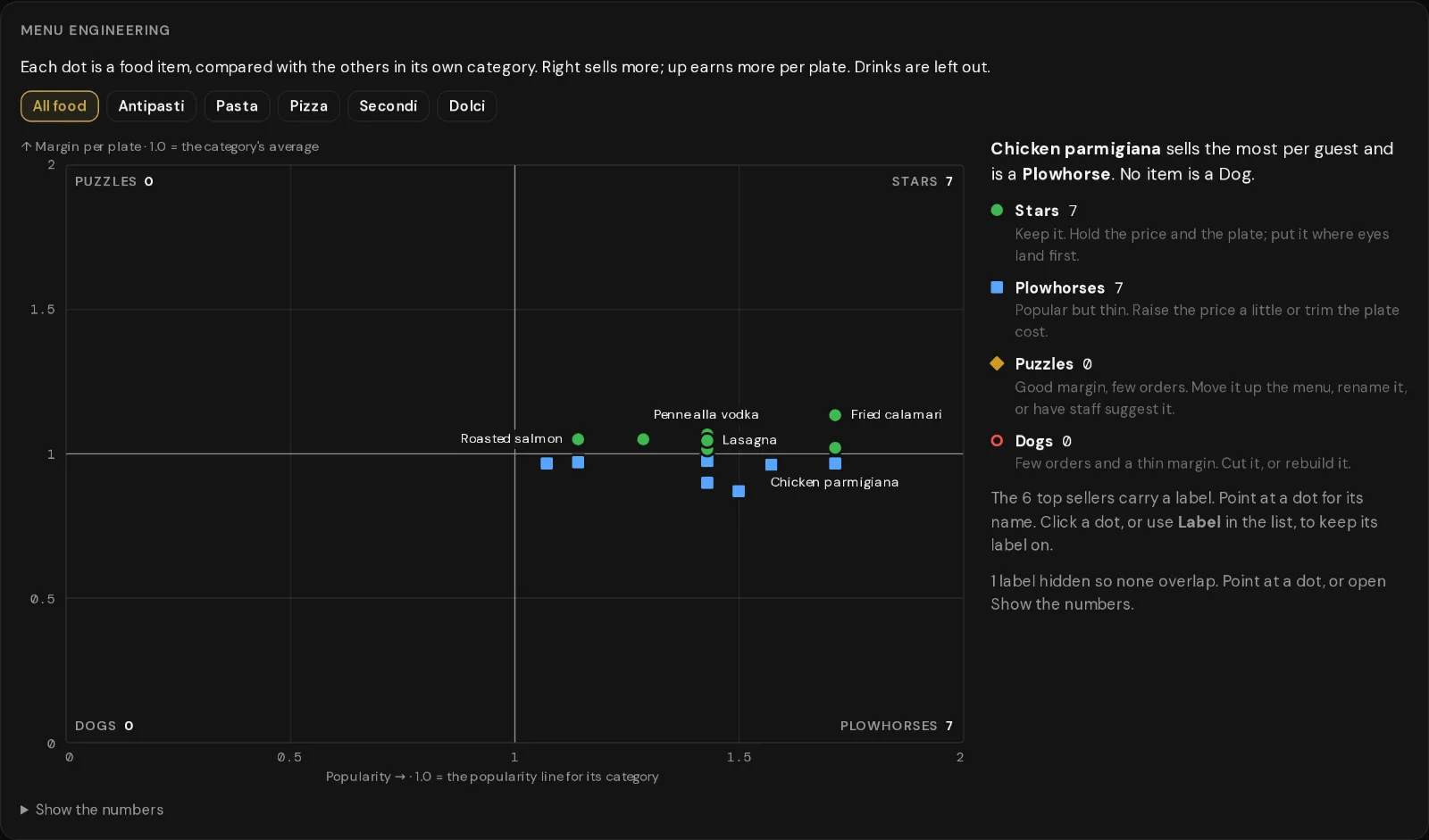
    Build each dish from its ingredients. You get the plate cost, the food cost % and a suggested price. Then your menu is sorted into Stars, Plowhorses, Puzzles and Dogs. You see what to push, what to fix and what to cut.

    Menu engineering chart for the Italian restaurant example. Each dish is a dot by popularity and margin. Seven are Stars, seven are Plowhorses, and none are Puzzles or Dogs.
  2. 02

    Add your staff.

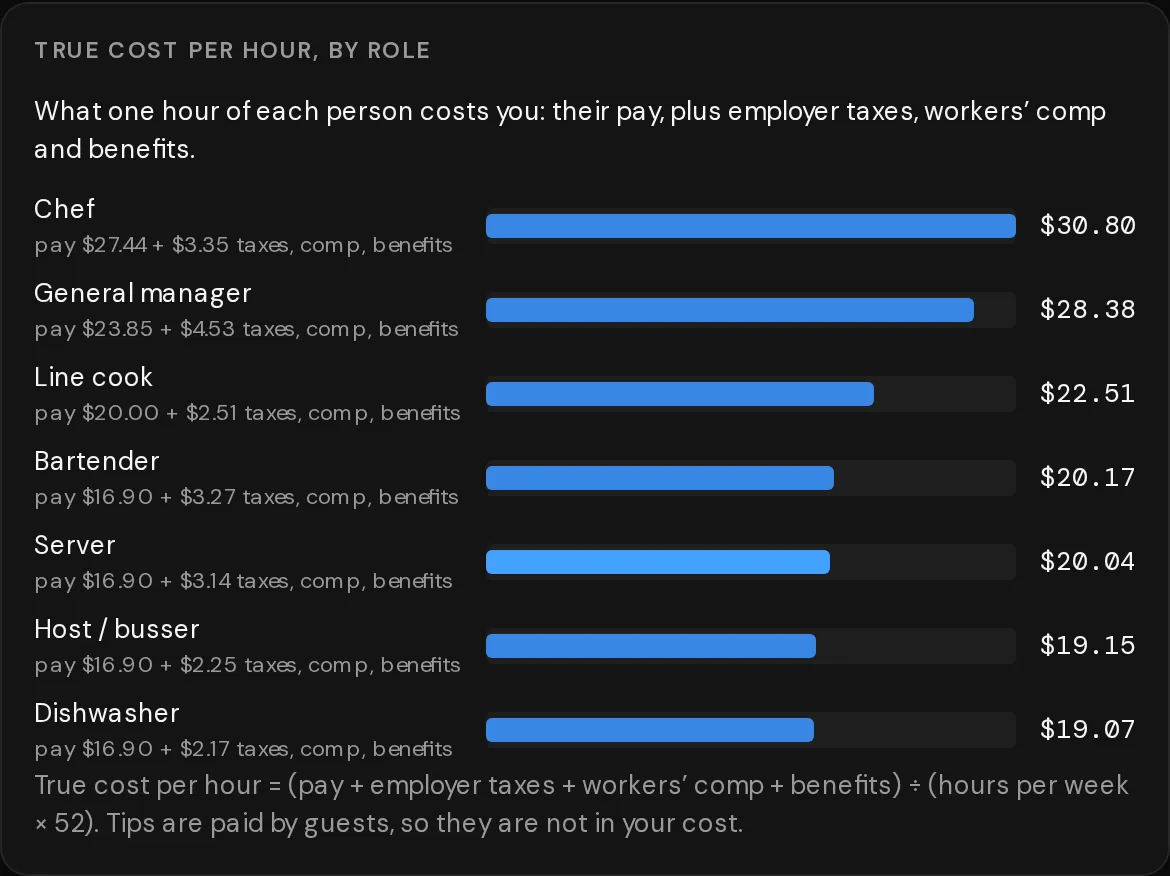
    Pick each role, the pay and the hours. You see what one hour of each person really costs you. That means their pay plus the employer taxes the law requires: Social Security, Medicare, FUTA and state unemployment. Workers' comp and benefits go in too. Florida rates are filled in.

    True cost per hour by role in the Italian restaurant example. A chef paid $27.44 an hour costs $30.80 once taxes, workers' comp and benefits are added.
  3. 03

    Rent or own, and every bill.

    Lease the space or buy the building with a mortgage. Add insurance, utilities, phone, your POS and every other bill. Each cost shows its tax benefit next to it.

  4. 04

    See the profit.

    You get a monthly profit and loss, the guests you need each day to break even, your payback time and a 60-month cash plan. Turn on "Show the math" and every line shows how it was worked out.

§ 03 — The dash rule

If we don't know a number, you see a dash.

Most plans fill a gap with a guess, or count it as zero. A rent of zero makes any restaurant look great. We leave the gap open. It is marked missing, it is listed, and we tell you where to fill it in.

The numbers we do fill in are marked too. A value tagged "example" is a placeholder for your own quote. A rate with a short code, like B9, comes from a named source you can check.

Try it at the top of the page: tick "I don't have a rent quote yet" and watch the profit turn into a dash.

A Missing inputs panel from the app. Three inputs are marked missing, each with a link to where you fill it in. Until then, every amount that uses them shows a dash.

§ 04 — After you open

Keep your plan next to the real month.

Demo mode
Plan before you open. Change any number as often as you like, right up to opening day, and keep tweaking each month after.
Live mode
Once you are open, enter each month's real sales and costs. You see them next to your plan, line by line.
What if?
Hire someone full time or part time, change your prices, or add a location. See what it does to profit, break-even and payback. Then apply it, or undo it.
More locations
Add a second or third site, one at a time. Each one copies your base model, so you change only what is different, like the rent or how busy it will be.

§ 05 — Taxes and your CPA

Know what is due, and hand your CPA a clean draft.

Planning estimate — not tax advice. Your CPA reviews and files.

Quarterly taxes

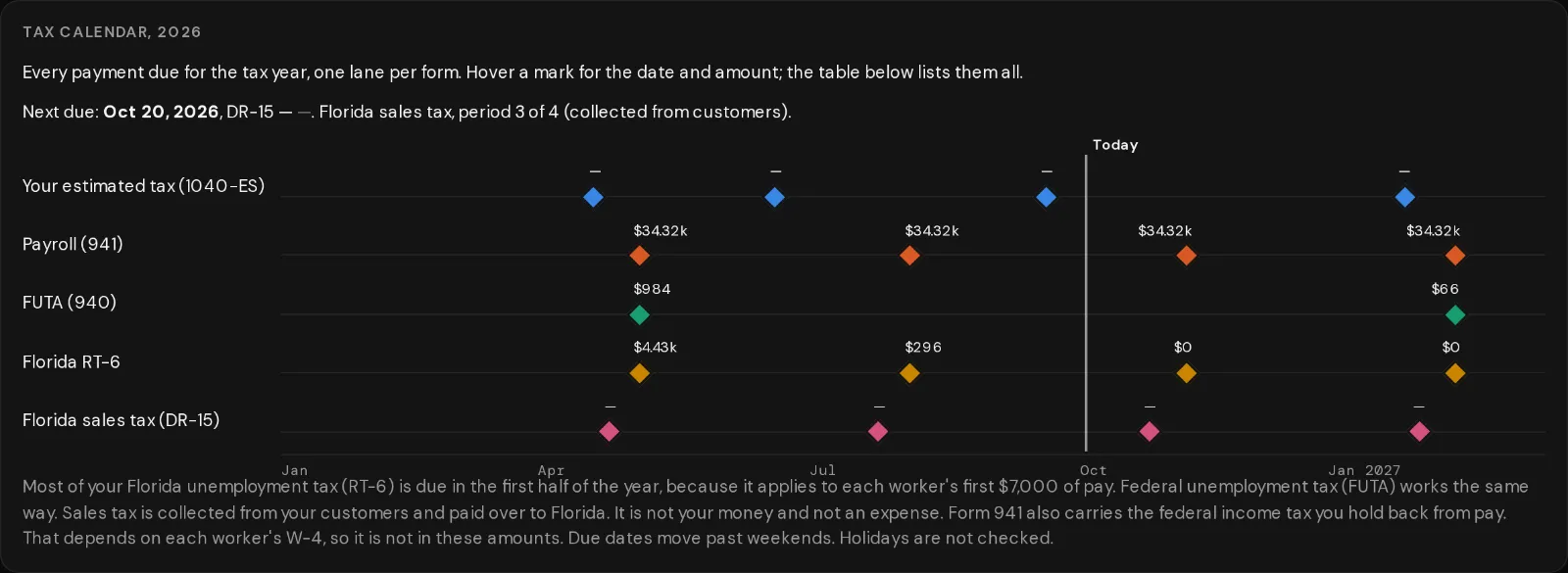
One calendar with every payment due. It covers your 1040-ES estimates with the safe harbor, Form 941 payroll, FUTA (Form 940), and Florida's RT-6 and DR-15.

No tax on tips or overtime

The new federal law (OBBBA) lets workers deduct tips and overtime from 2025 to 2028. We show what that may be worth to your staff and to you, and what you still owe as the employer. The rules we follow are in IRS Notice 2025-69.

What the business is worth

Three ways a buyer might price it: a multiple of SDE, a multiple of EBITDA, and an asset floor. Each one is a range, with the math.

The CPA handoff

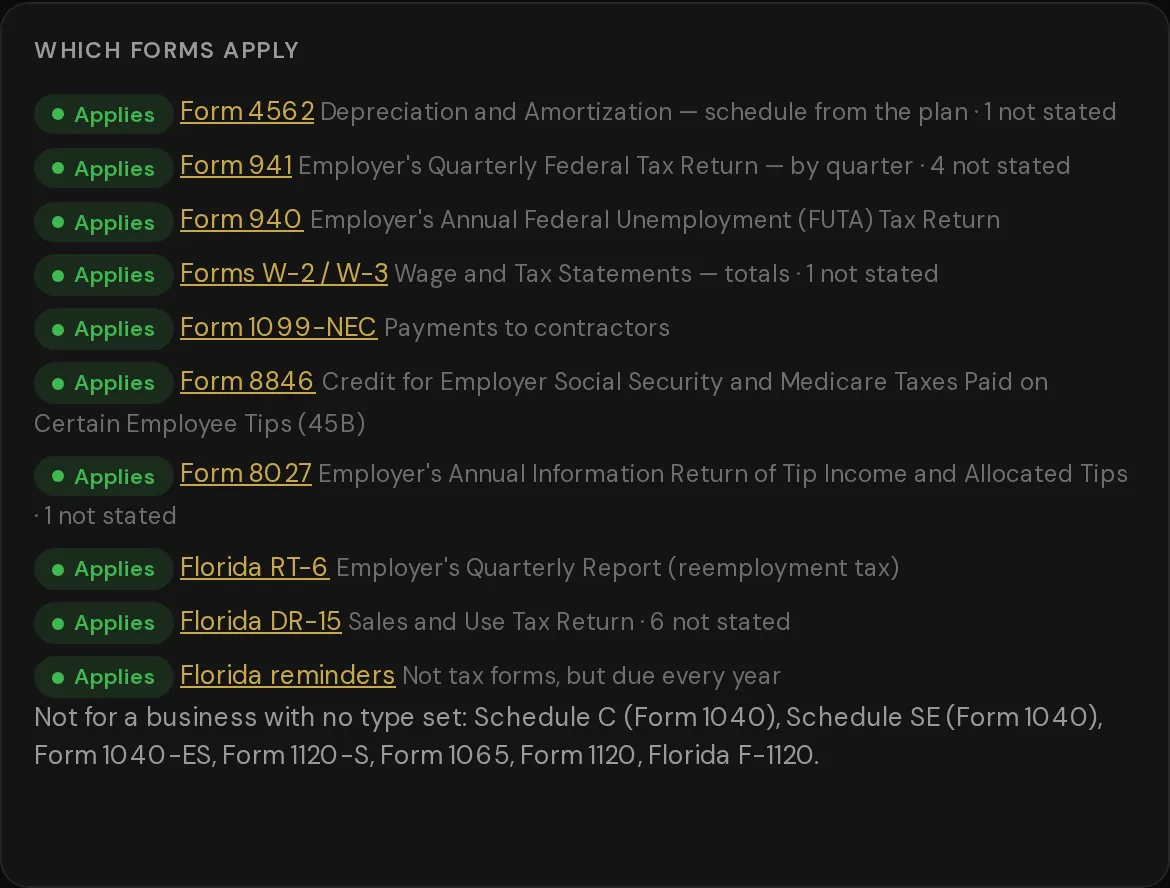
Your plan laid out the way the forms ask for it, line by line: Schedule C, 1120-S, 1120, 1065 and more. Get a PDF marked DRAFT, a CSV file, or a share link.

Tax calendar for 2026 in the Mexican restaurant example. One lane each for the 1040-ES estimates, Form 941, FUTA, Florida RT-6 and Florida sales tax. Estimates that need a missing input show a dash. Which forms apply, from the CPA handoff. Forms 4562, 941, 940, W-2 and W-3, 1099-NEC, 8846, 8027, Florida RT-6 and DR-15 apply. Schedule C, 1120-S, 1065 and 1120 wait until a business type is set.

§ 06 — Pricing

Start free. Pay when it's your own plan.

Billing period

Free demo

For looking hard before you leap.

$0

No account. No card.

Open the free demo
  • The three examples, and a full model of one location
  • Demo mode, with the math on every line
  • Saved in your browser, on this computer
  • Export and import your model as a file

Recommended

Plan

For planning your own business before you open.

—

Price shown at checkout.

  • Everything in the free demo, for your own business
  • Save models to your account and open them on any computer
  • What if? — try a change without touching your model
  • Quarterly tax estimates and due dates
  • What the business could sell for

Operate

For running it once you're open.

—

Price shown at checkout.

  • Everything in Plan
  • Live mode: each month's real numbers next to your plan
  • More locations, added one at a time
  • The CPA packet: a DRAFT PDF, a CSV file and a share link

Operate has no free trial. You can move up from Plan at any time, and you pay only the difference for the rest of the period. After you pay, we email you a license key. Paste it into the app to sign in. Had an account before? Sign in first so your saved models come back.

What each plan includes
FeatureFree demoPlanOperate
Full model of one location, the examples, Demo modeYesYesYes
Saved in your browser; export and import a fileYesYesYes
Save models to your accountNoYesYes
What if?, taxes and valuationNoYesYes
Live mode with your real monthly numbersNoNoYes
More than one locationNoNoYes
CPA packet (DRAFT PDF, CSV, share link)NoNoYes

§ 07 — Questions

Straight answers.

Is this tax advice?

No. It is a planning estimate. Every tax rate shows its year and its source, and you can change any of them. Your CPA reviews and files.

Where is my data kept?

In the free demo, your model is stored in your browser, on this computer. It is not sent to our server. On Plan or Operate, your models are also saved to your account, so you can open them on any computer. You can export a file at any time.

Does it work on my phone?

It is built for a laptop or desktop. On a phone you can read your numbers, but building a model needs a bigger screen and a keyboard.

What kinds of business does it fit?

Restaurants, and service businesses such as heating and air. Start from the Mexican restaurant, the Italian restaurant or the HVAC example, or start blank.

Does it work outside Florida?

Florida is filled in, including its payroll taxes and the RT-6 and DR-15 filings. Some other states have rates loaded. For a state we have not checked, a rate shows as missing until you enter it. We never slip in a guess.

How does the free trial work?

Plan comes with a free trial. You enter a card at checkout, and you are not charged until the trial ends. Operate has no trial.

How do I sign in?

After you pay, we email you a license key. Paste it into the app to sign in. Lost it? Use "Lost your key?" in the sign-in box and we will email it again.

Can I switch plans?

Yes. Moving up from Plan to Operate starts right away, and you pay only the difference. If you move down to Plan, your numbers are kept. Live mode, extra locations and the CPA packet are locked until you move back up.

What does an extra location cost?

On Operate, your first location is included. Each one after that has its own monthly or yearly price. The app asks you before it changes your bill.

Does it run payroll or do my books?

No. It is a planning tool. It does not pay anyone, file anything or replace your POS or your bookkeeping.

Run the numbers tonight, before anyone asks you to sign.